









Personal · Monthly
$10/ month
Billed every month. Cancel anytime.
- Everything in Anser, for you
- Plan with friends, who join free


DIGITAL PLANNER FOR 2027
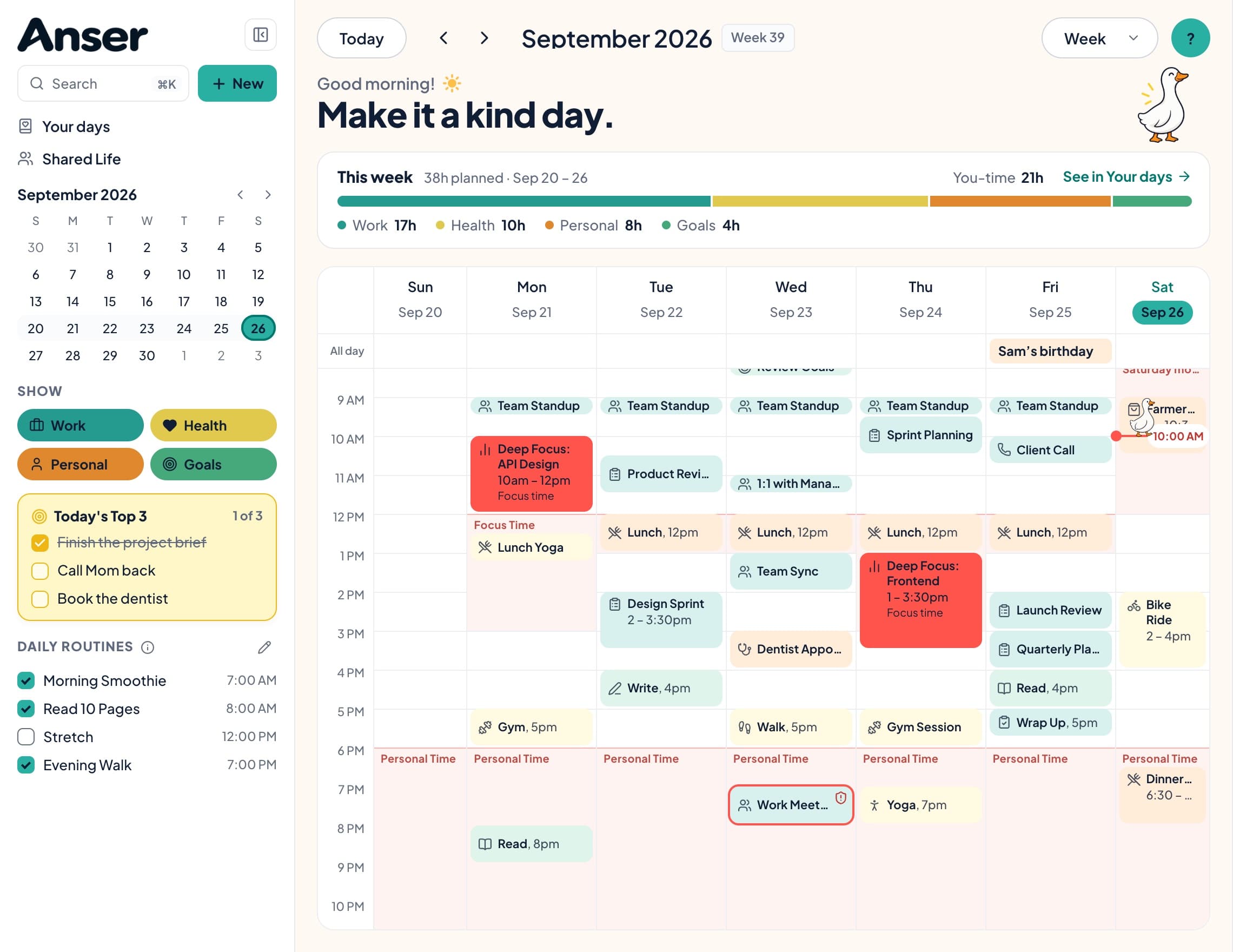
The look of a planner you’d buy for its pages, with your Google Calendar inside it. Your routines, your Top 3 and your protected evenings sit on the same page as your meetings.
Start your 14-day free trialNo credit card required. Works in your browser on Mac, iPad and iPhone; add it to your Home Screen.
THE PROBLEM
PDF planners are lovely to look at, but they’re static. The meeting that moved on Tuesday is still in its old slot, and the dentist your partner booked isn’t there. You copy the same routines out by hand every week. So you keep two planners: the pretty one, and the calendar that’s actually right.
If you love writing by hand with a pencil, a PDF planner still does that better. Anser is typed.
Events you already have show up in Anser, and what you add in Anser saves to the Google calendar you choose.
Mark the time you want to keep: evenings, lunch, sleep, a slow Saturday. When something lands in protected time, Anser tells you and helps you decline, or you allow it once.
A morning walk or ten pages of reading lives in your sidebar, not on the calendar. Tick them off and keep a streak.
Three things that would make today feel done. Everything else can wait.
Once a week Anser asks how the week felt, and Your days shows where your planned time went.
Choose a style (Summer Picnic, Minimal / Focus or Classic), light or dark, a font, a colour palette and an accent. Add a companion: a goose, hedgehog, puppy or kitty.
10 ready-made weeks and routines, like The Sunday Reset. See one on your own week before anything is added, and one tap undoes it.
See the schedule templatesPhotos and words for the year, beside goals broken into small steps. Put a month’s steps on your calendar, with one undo.
See the vision boardsSCHEDULE TEMPLATES
Ready-made weeks for how you want your days to feel. See one on your own calendar before anything is added.
PRICING
14-day free trial · No credit card required · Cancel anytime
$10/ month
Billed every month. Cancel anytime.
BEST VALUE · SAVE $25
$95/ year
About $7.92 a month, billed once a year.
UP TO 5 PEOPLE
$20/ month
Just $4 a person when all 5 seats are filled.
UP TO 5 PEOPLE · SAVE $50
$190/ year
About $3.17 a person a month with all 5 seats.
Friends you plan with in Shared Life join free, always. They only pay if they want their own full Anser.
Two-way Google Calendar sync, schedule templates, recurring events, notes and countdowns
Boundaries and protected time, and guilt-free declines in your own words
Your day at a glance, Today’s Top 3, routines and streaks, mood and gratitude
Vision boards for the year, each quarter and each month, and goals in small steps you can put on your calendar
Today’s page, a searchable archive, and a weekly reflection to shape next week
Plan with friends and family, see when you’re both free, and keep shared plans in your Google Calendar. Friends join free
A sticker tray, and your own stickers from a photo
A new sticker pack each month, with a paid plan
A companion, three styles, palettes and fonts, a monogram and cozy backgrounds
Reminders by push and email · Download or delete all your data
Two-way Google Calendar sync, schedule templates, recurring events, notes and countdowns
Boundaries and protected time, and guilt-free declines in your own words
Your day at a glance, Today’s Top 3, routines and streaks, mood and gratitude
Vision boards for the year, each quarter and each month, and goals in small steps you can put on your calendar
Today’s page, a searchable archive, and a weekly reflection to shape next week
Plan with friends and family, see when you’re both free, and keep shared plans in your Google Calendar. Friends join free
A sticker tray, and your own stickers from a photo
A new sticker pack each month, with a paid plan
A companion, three styles, palettes and fonts, a monogram and cozy backgrounds
Reminders by push and email · Download or delete all your data
You get 14 days of everything in Anser. No card needed. Anser reminds you in the app before the trial ends, and by email three days before and on the day it ends.
$10 a month, or $95 a year (about $7.92 a month). Prices are in US dollars, plus tax where it applies.
Yes. Connect it when you sign up with Google, or any time in Settings › Calendars. Anser shows the events already there, checks them against your boundaries, and saves new events you add in Anser to the Google calendar you choose.
In Settings › Calendars you pick which calendars to Show and which to Use for free time. Changes you make in Google usually show up in Anser within a few minutes, and Sync now checks straight away. If an event changed in both places, Anser asks which version to keep. Anser only changes your Google Calendar when you ask it to.
Anser keeps only what it needs: from calendars you show, each event’s title, times, place or meeting link, and the names of the people on it (not their email addresses); from calendars you use only for free time, just when you’re busy. Event descriptions aren’t copied. Turn a calendar off (neither shown nor used for free time) and its events are removed from Anser; they stay in Google.
The part of your week you want to keep: your working hours, evenings, sleep, or anything else you set up in Settings › Boundaries. When something lands inside it, Anser tells you, and you decide whether to allow it once or decline.
Anser works in your phone’s browser. Add it to your Home Screen to open it like an app and get notifications. On iPhone and iPad: Share, then Add to Home Screen.
Yes, in Settings › Appearance. Choose the goose, the hedgehog, the puppy or the kitty as your companion, or turn it off and simple icons take its place. You can also pick a style (Summer Picnic, Minimal / Focus or Classic), light or dark, a font, a colour palette and an accent, and turn on the weather beside your greeting. There’s also a monogram for your sidebar, cozy backgrounds with a solid, frosted or see-through calendar, and a highlighter look for categories.
Only you. Today’s page, your moods, gratitude notes and reflections, and your vision board are private to you. Photos and files you attach are kept in private storage that only your account can open. None of it is shared with Shared Life or Friends & Family.
If you share a calendar, the people you add can see that calendar’s events.
Yes, any time: Settings › Profile & account › Download my data. You get one ZIP with your journal, calendar, routines, moods, reflections, goals, boundaries and vision board photos, in files that open without Anser.
14 days of everything. No card needed.
Start your 14-day free trial