Blog Planner palettes 2 min read
Violet signal: an Evangelion-inspired colour palette for your planner
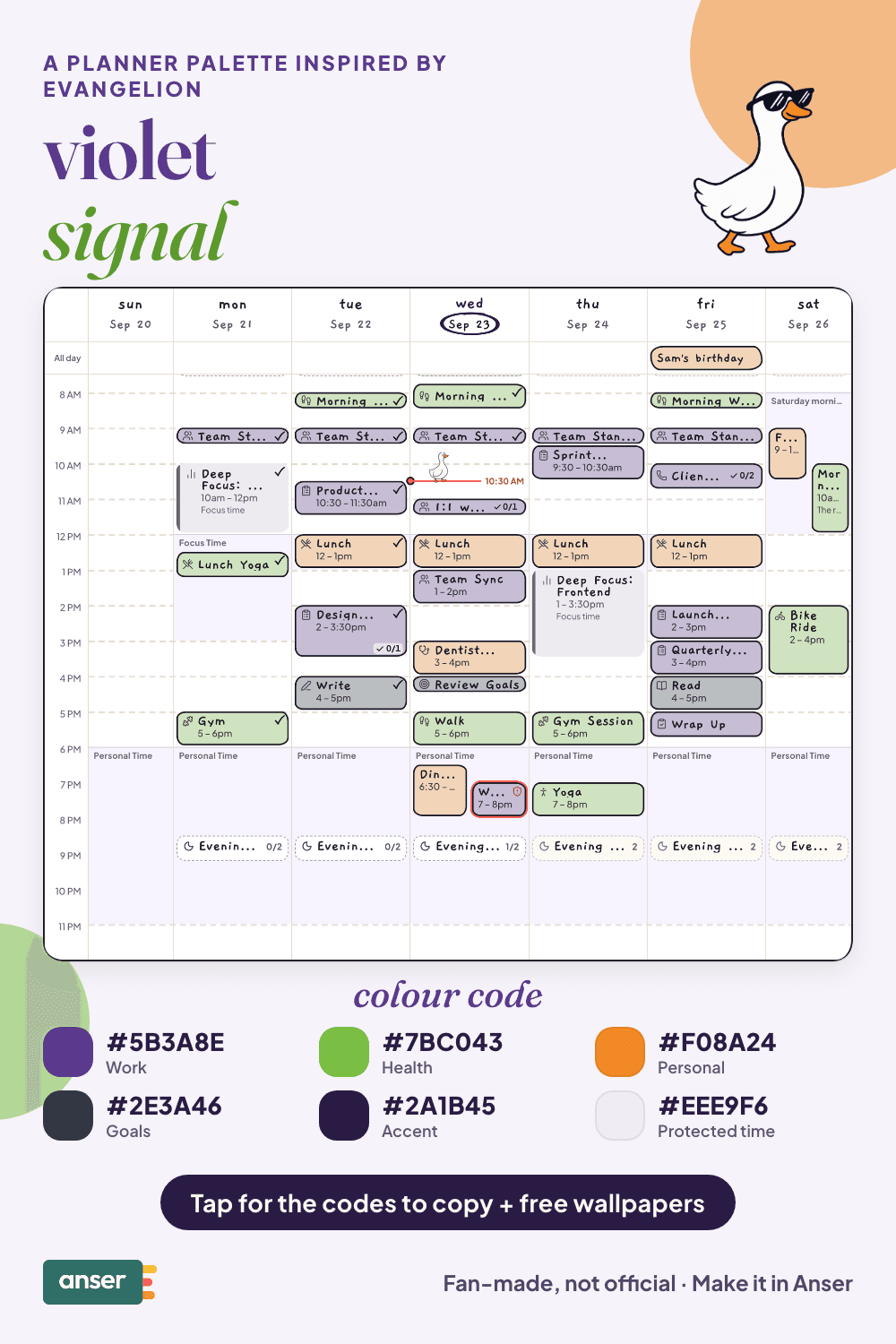
Violet signal: a planner colour palette inspired by Evangelion, with hex codes. Armour purple, signal green, warning orange and gunmetal.
Armour purple, signal green and a flash of orange: one of the most recognisable colour schemes in anime. Loud on purpose.
A fan-made palette. Anser isn’t affiliated with or endorsed by the makers of Evangelion.
The palette
Violet signal
Tap a colour to copy it
Where each colour goes
| Colour | Hex | Use it for |
|---|---|---|
| Work (armour purple) | #5B3A8E | Work blocks, in the colour everything else plays against |
| Health (signal green) | #7BC043 | Movement, sleep and food, impossible to overlook |
| Personal (warning orange) | #F08A24 | People and evenings, the warm one |
| Goals (gunmetal) | #2E3A46 | Long-term plans, kept quiet and serious |
| Accent (deep violet) | #2A1B45 | Buttons, today’s date and highlights |
| Protected time (pale lilac) | #EEE9F6 | A faint wash over your protected time |
Why purple, green and orange work
Purple, green and orange are the three secondary colours, spaced evenly around the colour wheel. That even spacing is why they clash in a way that looks deliberate, and why you can tell every block apart at a glance. Gunmetal is the fourth, so one category stays calm.
Your week in violet signal
You can (not) do everything
- Three priorities, not thirty. Pick them before the day picks for you.
- Protect the recovery time. The harder the week, the more the evenings matter.
- Say no once. A clear no is kinder than a maybe.
- Get in the bath. Rest counts as doing something.
Make it in Anser
The quickest way: tap Use this palette in Anser on the palette. It opens on your own week, to keep or undo. To set it up by hand:
- In Anser, open Settings › Categories. Tap the colour next to Work and paste its hex code. Do the same for Health, Personal and Goals.
- Open Settings › Appearance › Colours and tap Save as my palette, so you can switch back any time.
- Still in Colours, under Accent, choose Your own and paste the accent.
- Open Settings › Boundaries › How protected time looks, choose Your own and paste the protected time colour. It also colours your Deep Focus time.
Changed your mind? Your saved palettes are under See all in Settings › Appearance › Colours.
Free downloads in violet signal
Free downloads
Free violet signal downloads
October and November calendar wallpapers for your phone and desktop, and a printable week in A4 and US Letter.
Pair it with a calm week
3 priorities. Lots of buffer. That’s the schedule. The Low-Overwhelm Day is a free schedule template you can add to your calendar or preview in Anser.
Use this in Anser
The Low-Overwhelm Day
3 priorities. Lots of buffer. That’s the schedule. For days when a giant to-do list doesn’t work.
- 8:30 AM: Arrive. No tasks yet.
- 8:45 AM: Pick today’s Top 3
- 9:00 AM: Focus 1
- 10:30 AM: Nothing scheduled
- 10:45 AM: Admin sprint
- 12:00 PM: Lunch
- 1:00 PM: Meetings
- 2:15 PM: Focus 2
More palettes like this
Try Anser free for 14 days, no card needed. A calm weekly planner that works with your Google Calendar, in the colours you like.


Comments
No comments yet.