Blog Planner palettes 2 min read
Tall grass: a Pokémon-inspired colour palette for your planner
Tall grass: a planner colour palette inspired by Pokémon, with hex codes. Water blue, grass green, electric yellow and fire orange.
Water blue, grass green, electric yellow and fire orange. Choosing a starter is hard, so this palette takes all three and adds a spark. It’s named for the place every journey begins.
A fan-made palette. Anser isn’t affiliated with or endorsed by the makers of Pokémon.
The palette
Tall grass
Tap a colour to copy it
Where each colour goes
| Colour | Hex | Use it for |
|---|---|---|
| Work (water) | #4A90D9 | Work blocks, in the calm one |
| Health (grass) | #5DAA4F | Walks, movement and time outside |
| Personal (electric) | #F7D02C | Friends and fun, the brightest spot of the week |
| Goals (fire) | #F08030 | Your goals, the one with drive |
| Accent (night route) | #2E3A59 | Buttons, today’s date and highlights |
| Protected time (pale sky) | #EFF6FF | A light wash over your protected time |
One type for each category
Four types, four categories. Water is the calm one, so it takes Work, the colour you’ll see most. Grass is Health, for obvious reasons. Electric yellow is Personal, because that’s where the fun is. Fire goes on Goals.
The fire here is a true orange. Anser keeps one coral for protected time and won’t take a red-orange that sits too close to it.
Your week in tall grass
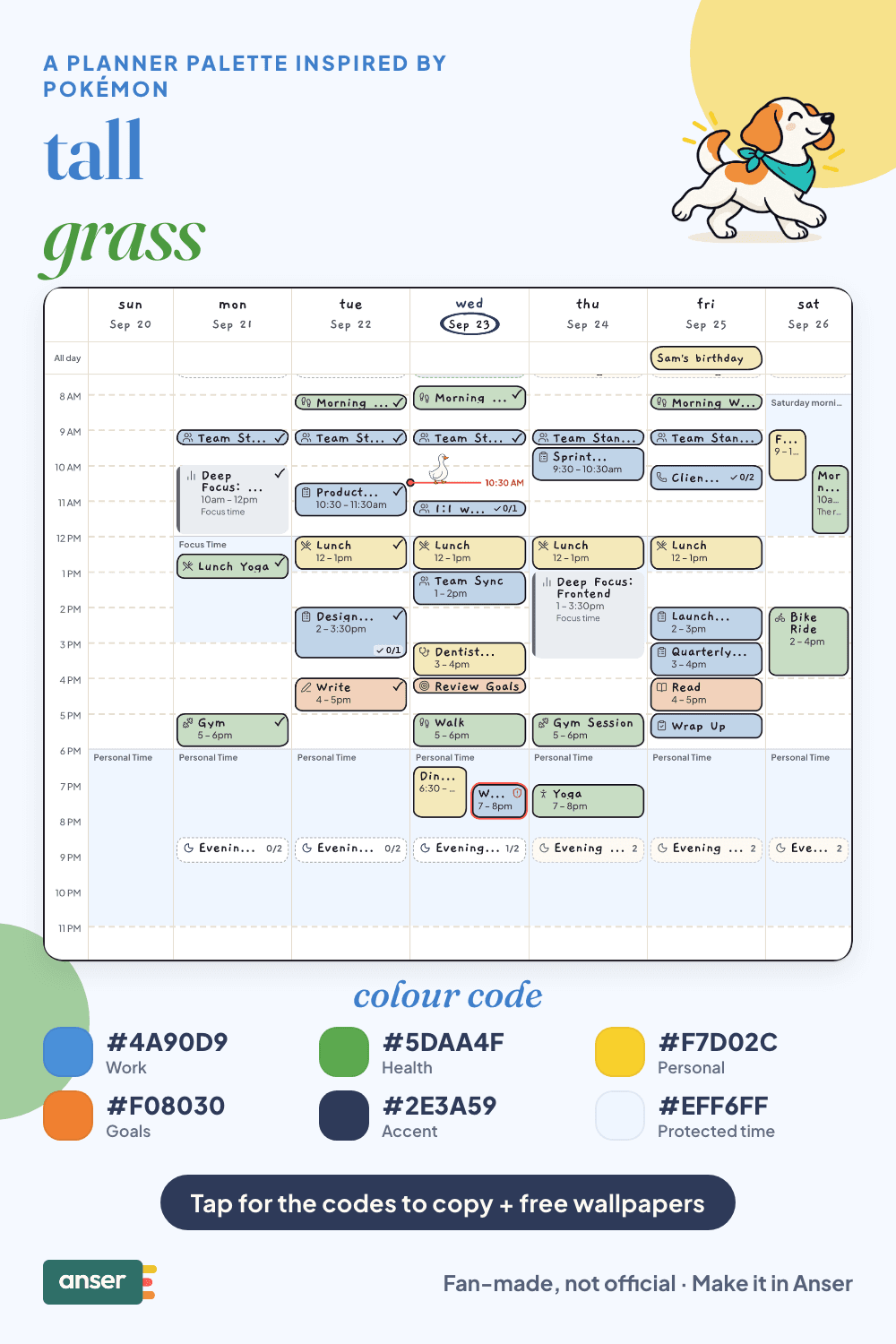
Train a little every day
- Short sessions beat one long grind. Twenty minutes a day adds up.
- Rest heals. A night off is part of the plan.
- Walk more. It’s how eggs hatch, and it’s good for you too.
- One badge at a time. Pick the next goal, not all eight.
Make it in Anser
The quickest way: tap Use this palette in Anser on the palette. It opens on your own week, to keep or undo. To set it up by hand:
- In Anser, open Settings › Categories. Tap the colour next to Work and paste its hex code. Do the same for Health, Personal and Goals.
- Open Settings › Appearance › Colours and tap Save as my palette, so you can switch back any time.
- Still in Colours, under Accent, choose Your own and paste the accent.
- Open Settings › Boundaries › How protected time looks, choose Your own and paste the protected time colour. It also colours your Deep Focus time.
Changed your mind? Your saved palettes are under See all in Settings › Appearance › Colours.
Free downloads in tall grass
Free downloads
Free tall grass downloads
October and November calendar wallpapers for your phone and desktop, and a printable week in A4 and US Letter.
Pair it with a calm week
You don’t need to work on it every night. Side Project, No Burnout is a free schedule template you can add to your calendar or preview in Anser.
Use this in Anser
Side Project, No Burnout
You don’t need to work on it every night. Build something without giving it your whole life.
- 7:00 PM: Off · protected recovery
More palettes like this
Try Anser free for 14 days, no card needed. A calm weekly planner that works with your Google Calendar, in the colours you like.


Comments
No comments yet.