Blog Planner palettes 2 min read
Farm valley: a Stardew Valley-inspired colour palette for your planner
Farm valley: a planner colour palette inspired by Stardew Valley, with hex codes. Barn wood, spring green, sunflower yellow and river blue.
Barn wood, spring green, sunflower yellow and a river blue. For anyone who has planned a farm more carefully than their own week.
A fan-made palette. Anser isn’t affiliated with or endorsed by the makers of Stardew Valley.
The palette
Farm valley
Tap a colour to copy it
Where each colour goes
| Colour | Hex | Use it for |
|---|---|---|
| Work (barn wood) | #8B5E34 | Work blocks, steady and warm |
| Health (spring crop) | #6BA644 | Walks, movement and meals you actually cook |
| Personal (sunflower) | #F2C14E | The bright one, for people and festivals of your own |
| Goals (river) | #5B9BD5 | The only cool colour, for long-term plans |
| Accent (tilled soil) | #3F2A1D | Buttons, today’s date and highlights |
| Protected time (hay) | #F6EDD3 | A warm wash over your protected time |
Earth first, then one bright thing
Brown is the colour you’ll see most, and that’s deliberate: it’s easy on the eyes for a full working day. Sunflower yellow is the brightest colour here, so it goes on Personal, where the good parts of the week are. River blue is the one cool colour among the warm ones, which makes your goals easy to find.
Your week in farm valley
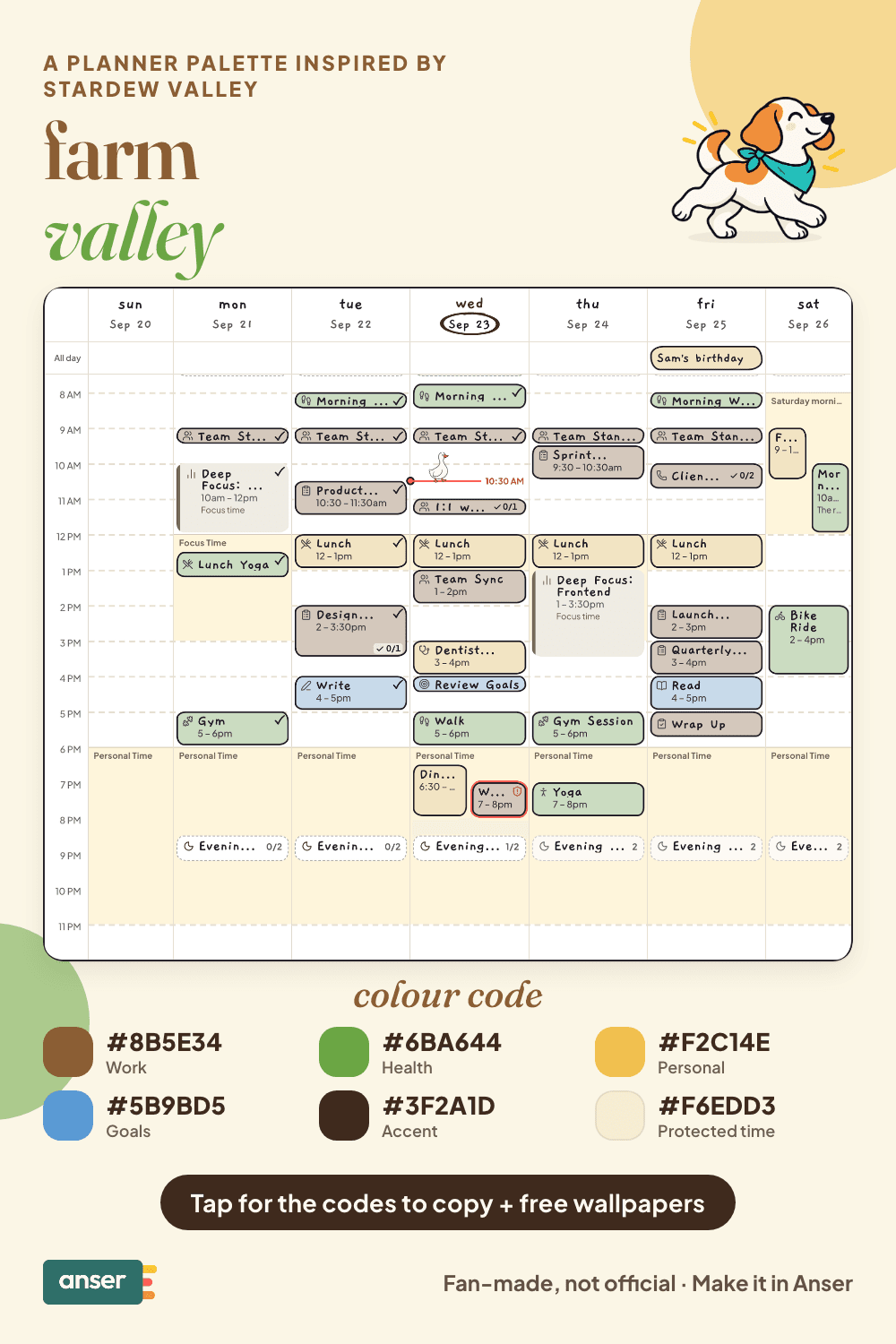
Plan your week like a farm day
- Water first. Do the small daily things before anything else.
- Don’t spend all your energy by noon. Leave a gap after lunch.
- One long project, a bit each day. That’s how big things get finished.
- In bed well before 2am. You know what happens otherwise.
Make it in Anser
The quickest way: tap Use this palette in Anser on the palette. It opens on your own week, to keep or undo. To set it up by hand:
- In Anser, open Settings › Categories. Tap the colour next to Work and paste its hex code. Do the same for Health, Personal and Goals.
- Open Settings › Appearance › Colours and tap Save as my palette, so you can switch back any time.
- Still in Colours, under Accent, choose Your own and paste the accent.
- Open Settings › Boundaries › How protected time looks, choose Your own and paste the protected time colour. It also colours your Deep Focus time.
Changed your mind? Your saved palettes are under See all in Settings › Appearance › Colours.
Free downloads in farm valley
Free downloads
Free farm valley downloads
October and November calendar wallpapers for your phone and desktop, and a printable week in A4 and US Letter.
Pair it with a calm week
Resetting your week shouldn’t take your whole Sunday. The Sunday Reset is a free schedule template you can add to your calendar or preview in Anser.
Use this in Anser
The Sunday Reset
Resetting your week shouldn’t take your whole Sunday. Start Monday ready, and still have Sunday evening.
- 9:00 AM: Slow morning
- 10:00 AM: Home reset · bedding, surfaces, laundry
- 11:30 AM: Groceries
- 12:30 PM: Lunch
- 1:30 PM: Meal prep
- 3:00 PM: Digital reset · inbox, photos, tabs
- 3:30 PM: Weekly calendar check-in
- 4:00 PM: Protect the week
More palettes like this
Try Anser free for 14 days, no card needed. A calm weekly planner that works with your Google Calendar, in the colours you like.


Comments
No comments yet.