Blog Planner palettes 2 min read
Island life: an Animal Crossing-inspired colour palette for your planner
Island life: a planner colour palette inspired by Animal Crossing, with hex codes. Lagoon teal, leaf green, warm sand and a clear sky blue.
Lagoon teal, leaf green, warm sand and a clear sky. A palette for anyone who’d like their week to feel a bit more like their island.
A fan-made palette. Anser isn’t affiliated with or endorsed by the makers of Animal Crossing.
The palette
Island life
Tap a colour to copy it
Where each colour goes
| Colour | Hex | Use it for |
|---|---|---|
| Work (lagoon) | #3FA796 | Work blocks, in a teal that never looks urgent |
| Health (leaf) | #7DBB5C | Walks, stretching and time outdoors |
| Personal (sand) | #F2DFA7 | Friends, visits and slow afternoons |
| Goals (sky) | #7EC8E3 | The things you’re collecting and building towards |
| Accent (driftwood) | #5B4A2E | Buttons, today’s date and highlights |
| Protected time (morning mist) | #EEF7E6 | A pale green wash over your protected time |
Why it feels calm
Every colour here is soft and a little sun-faded, the way a cosy game looks. Nothing is black and nothing is neon. Teal and green sit side by side on the colour wheel, so your work and your health read as one gentle stretch of the day, and sand marks the time that’s yours. If you’d like one category to stand out more, move the sky blue onto it.
Your week in island life
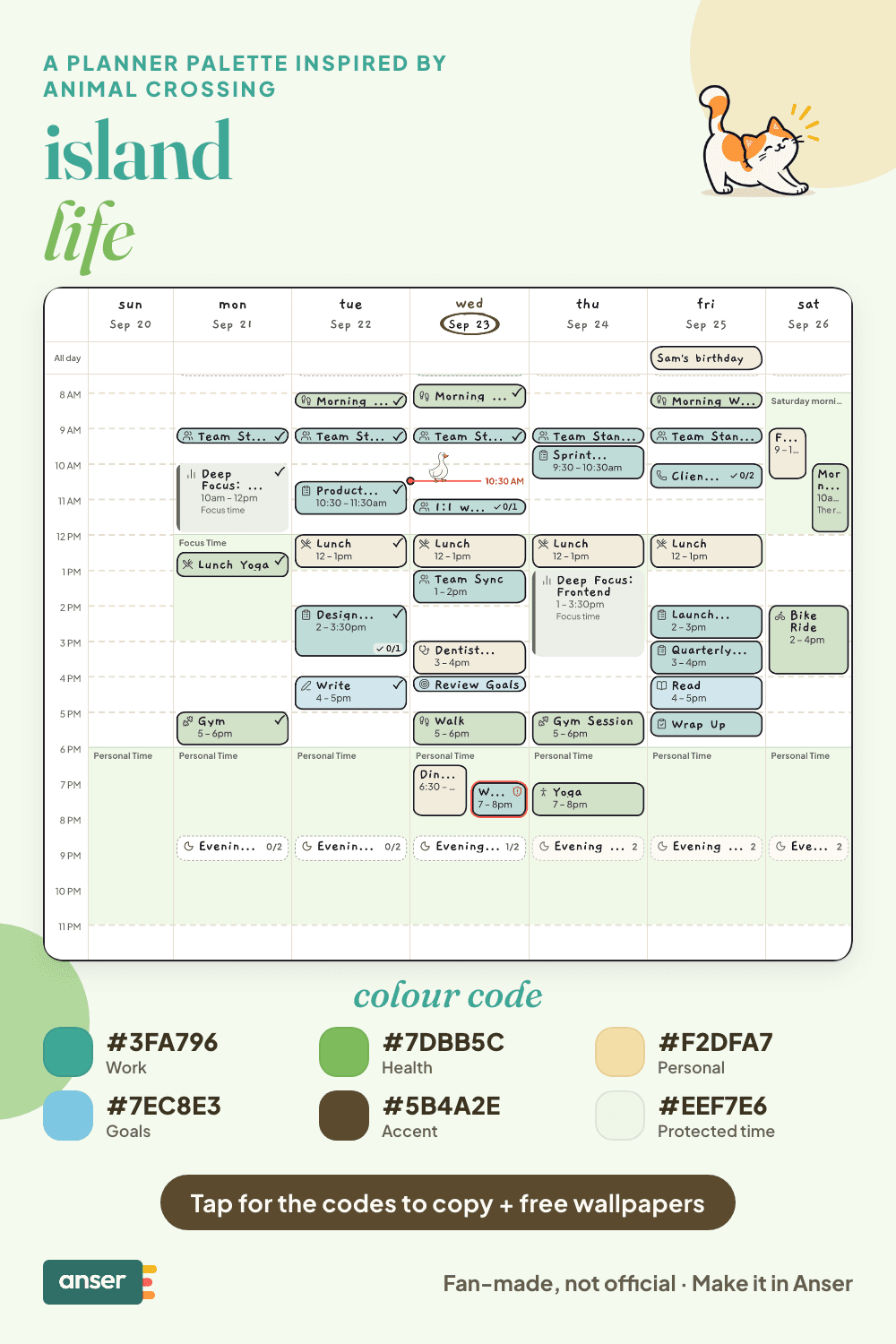
An island-paced week
- One small job each morning. Water the plants, check the post, then start.
- Visit a friend. Put one catch-up on the calendar.
- Decorate something. A shelf counts.
- Play, on purpose. An hour on your island goes in as Personal time, not as guilt.
Make it in Anser
The quickest way: tap Use this palette in Anser on the palette. It opens on your own week, to keep or undo. To set it up by hand:
- In Anser, open Settings › Categories. Tap the colour next to Work and paste its hex code. Do the same for Health, Personal and Goals.
- Open Settings › Appearance › Colours and tap Save as my palette, so you can switch back any time.
- Still in Colours, under Accent, choose Your own and paste the accent.
- Open Settings › Boundaries › How protected time looks, choose Your own and paste the protected time colour. It also colours your Deep Focus time.
Changed your mind? Your saved palettes are under See all in Settings › Appearance › Colours.
Free downloads in island life
Free downloads
Free island life downloads
October and November calendar wallpapers for your phone and desktop, and a printable week in A4 and US Letter.
Pair it with a calm week
A slow start you can actually keep. The Gentle Morning Routine is a free schedule template you can add to your calendar or preview in Anser.
Use this in Anser
The Gentle Morning Routine
A slow start you can actually keep. Water, daylight and a few pages before the day asks for anything.
- 7:00 AM: Water before phone
- 7:05 AM: Daylight · open the curtains
- 7:15 AM: Stretch
- 7:30 AM: Coffee or tea, sitting down
- 7:50 AM: Read a few pages
- 8:05 AM: Make the bed
More palettes like this
Try Anser free for 14 days, no card needed. A calm weekly planner that works with your Google Calendar, in the colours you like.


Comments
No comments yet.