Blog Planner palettes 2 min read
Plaid sweater colour palette: autumn hex codes for your planner
A plaid sweater colour palette with hex codes: chocolate, camel, cream knit and navy. The colours of a plaid sweater, for your planner.
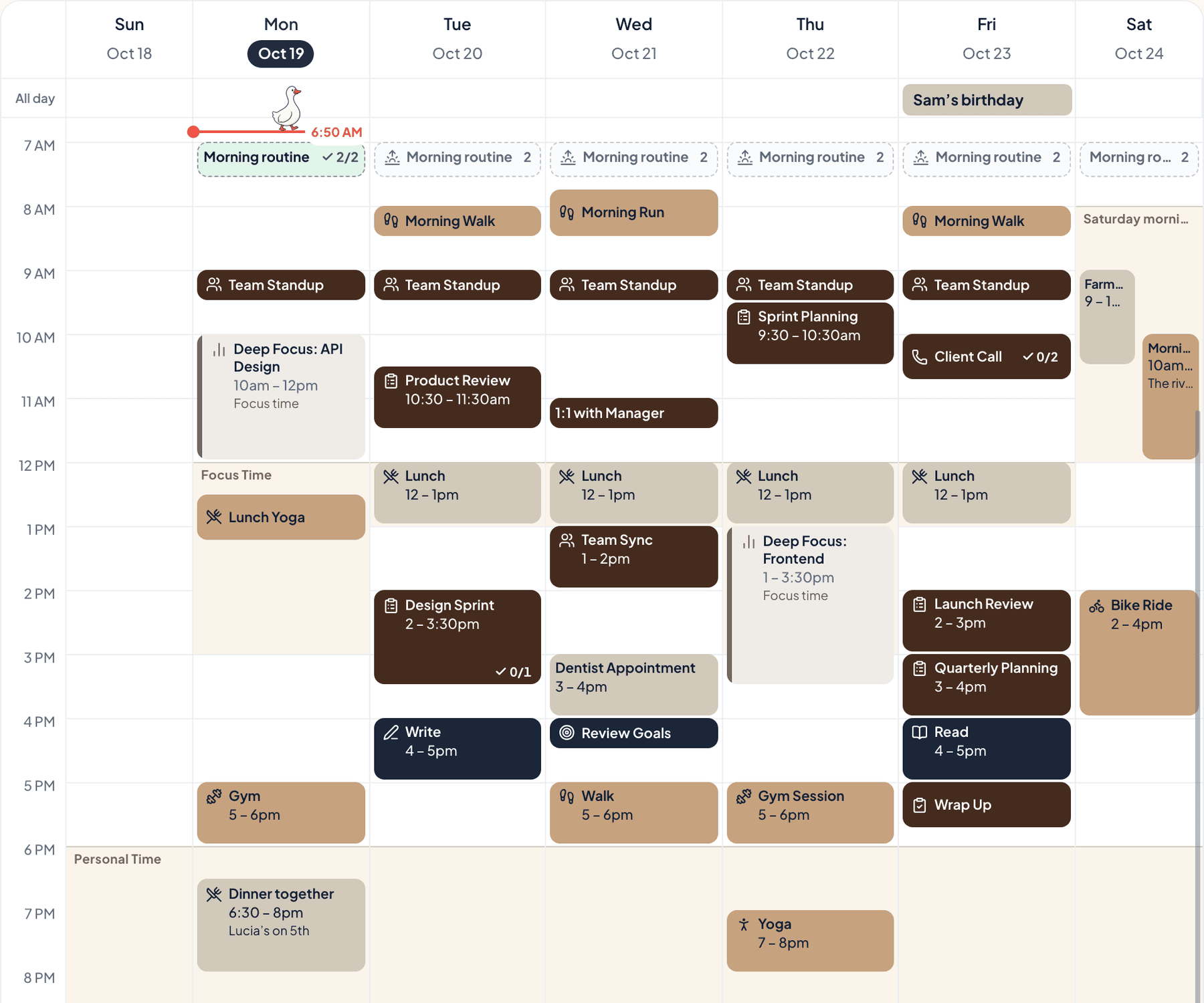
Chocolate, camel, cream knit and navy. The colours of a classic plaid sweater, the one that comes out when the mornings turn cold.
The palette
Plaid sweater
Tap a colour to copy it
Where each colour goes
| Colour | Hex | Use it for |
|---|---|---|
| Work (chocolate) | #4E3022 | Work blocks, in a deep chocolate |
| Health (camel) | #B08A62 | Walks and the gym, in camel |
| Personal (cream knit) | #EDE4D3 | Evenings and weekends, in cream knit |
| Goals (navy) | #1F2B40 | What you’re working towards, in navy |
| Accent (navy) | #1F2B40 | Buttons, today’s date and highlights |
| Protected time (wool white) | #F4EEE4 | A soft wash over your protected time |
Three warm colours and a navy thread
Chocolate, camel and cream come from one warm family, so a full week in them looks calm. Navy is the thread that runs across them, the way it does in the plaid. It’s on Goals and it’s the accent, so what you’re working towards and today’s date are what stand out.
Your week in plaid sweater
The week at the top of this post is a real week in Anser, in the Summer Picnic style with the Bold look for categories, so every event shows its full colour. To get the same look, open Settings › Appearance › Colours › How categories look and choose Bold. The palette works in every style.
A week for layers
- Get the sweaters down from the top shelf. All of them, then put half back.
- A long walk on the first cold, bright day.
- Fix one thing that’s been waiting. A loose button counts.
- One evening in, with something warm to drink.
Make it in Anser
The quickest way: tap Use this palette in Anser on the palette. It opens on your own week, to keep or undo. To set it up by hand:
- In Anser, open Settings › Categories. Tap the colour next to Work and paste its hex code. Do the same for Health, Personal and Goals.
- Open Settings › Appearance › Colours and tap Save as my palette, so you can switch back any time.
- Still in Colours, under Accent, choose Your own and paste the accent.
- Open Settings › Boundaries › How protected time looks, choose Your own and paste the protected time colour. It also colours your Deep Focus time.
Changed your mind? Your saved palettes are under See all in Settings › Appearance › Colours.
Pair it with a calm week
A slow start you can actually keep. The Gentle Morning Routine is a free schedule template you can add to your calendar or preview in Anser.
Use this in Anser
The Gentle Morning Routine
A slow start you can actually keep. Water, daylight and a few pages before the day asks for anything.
- 7:00 AM: Water before phone
- 7:05 AM: Daylight · open the curtains
- 7:15 AM: Stretch
- 7:30 AM: Coffee or tea, sitting down
- 7:50 AM: Read a few pages
- 8:05 AM: Make the bed
More palettes like this
Try Anser free for 14 days, no card needed. A calm weekly planner that works with your Google Calendar, in the colours you like.
Comments
No comments yet.