Blog Planner palettes 2 min read
Falling blocks: a Tetris-inspired colour palette for your planner
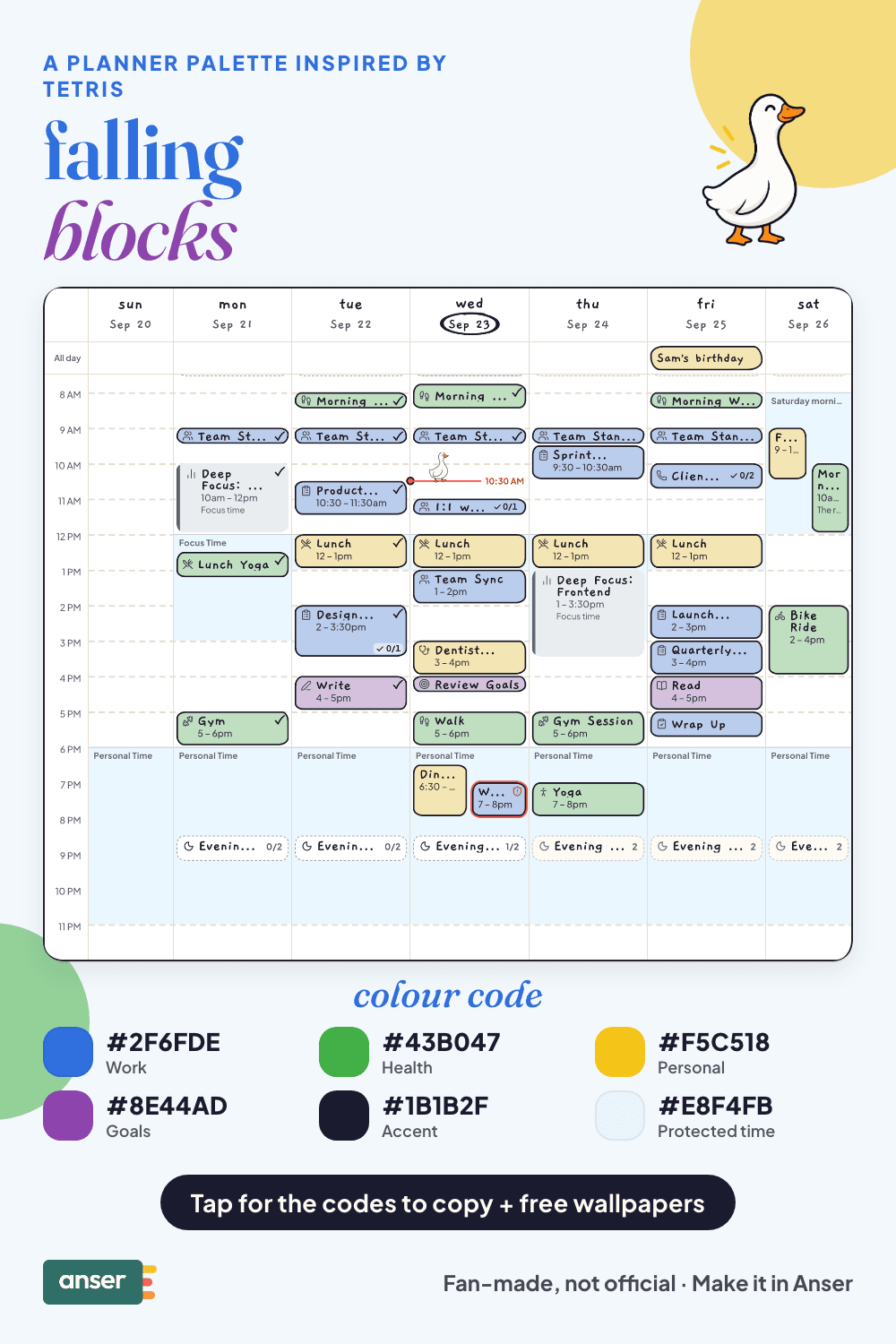
Falling blocks: a planner colour palette inspired by Tetris, with hex codes. Blue, green, yellow and purple on a clean grid.
Blue, green, yellow and purple blocks on a clean grid. A full week already looks like a game of Tetris, so it may as well have the colours.
A fan-made palette. Anser isn’t affiliated with or endorsed by the makers of Tetris.
The palette
Falling blocks
Tap a colour to copy it
Where each colour goes
| Colour | Hex | Use it for |
|---|---|---|
| Work (J blue) | #2F6FDE | Work blocks, the ones that fill most of the board |
| Health (S green) | #43B047 | Movement, meals and sleep |
| Personal (O yellow) | #F5C518 | People and plans, the cheerful square |
| Goals (T purple) | #8E44AD | Your goals, the piece that fits where nothing else does |
| Accent (night grid) | #1B1B2F | Buttons, today’s date and highlights |
| Protected time (pale cyan) | #E8F4FB | A cool wash over your protected time, a nod to the long piece |
Four pieces, and the one that had to sit out
Modern Tetris gives each of its seven pieces a colour of its own. Anser has four categories, so four pieces made the palette and the long cyan piece became the protected time colour, paled right down.
The red piece had to sit out. Anser keeps one coral for protected time and won’t take a red that close to it.
Your week in falling blocks
Stack your week like a good game
- Leave a gap for the long piece. Keep one clear stretch for the big task.
- Clear lines early. Do the small jobs first thing, before they pile up.
- Don’t stack to the top. A week with no space left is one surprise away from over.
- Slow the drop. Evenings are for the pieces to stop falling.
Make it in Anser
The quickest way: tap Use this palette in Anser on the palette. It opens on your own week, to keep or undo. To set it up by hand:
- In Anser, open Settings › Categories. Tap the colour next to Work and paste its hex code. Do the same for Health, Personal and Goals.
- Open Settings › Appearance › Colours and tap Save as my palette, so you can switch back any time.
- Still in Colours, under Accent, choose Your own and paste the accent.
- Open Settings › Boundaries › How protected time looks, choose Your own and paste the protected time colour. It also colours your Deep Focus time.
Changed your mind? Your saved palettes are under See all in Settings › Appearance › Colours.
Free downloads in falling blocks
Free downloads
Free falling blocks downloads
October and November calendar wallpapers for your phone and desktop, and a printable week in A4 and US Letter.
Pair it with a calm week
Two long focus blocks a day. Meetings wait for the afternoon. The Deep Work Week is a free schedule template you can add to your calendar or preview in Anser.
Use this in Anser
The Deep Work Week
Two long focus blocks a day. Meetings wait for the afternoon. For work that needs your whole head, not the gaps between calls.
- 8:30 AM: Pick today’s Top 3
- 8:45 AM: Notifications off
- 9:00 AM: Deep work
- 11:30 AM: Messages and admin
- 12:00 PM: Lunch
- 1:00 PM: Meetings
- 3:15 PM: Deep work, part two
- 5:15 PM: Shutdown ritual
More palettes like this
Try Anser free for 14 days, no card needed. A calm weekly planner that works with your Google Calendar, in the colours you like.


Comments
No comments yet.