Blog Planner palettes 2 min read
Space jazz: a Cowboy Bebop-inspired colour palette for your planner
Space jazz: a planner colour palette inspired by Cowboy Bebop, with hex codes. Suit blue, shirt yellow, wine red and record-sleeve cream.
A blue suit, a yellow shirt, wine red and the cream of an old record sleeve. Cool, a little worn, and in no hurry.
A fan-made palette. Anser isn’t affiliated with or endorsed by the makers of Cowboy Bebop.
The palette
Space jazz
Tap a colour to copy it
Where each colour goes
| Colour | Hex | Use it for |
|---|---|---|
| Work (suit blue) | #2B4570 | Work blocks, cool and unbothered |
| Health (shirt yellow) | #E3B23C | The bright one, for getting up and moving |
| Personal (record sleeve) | #D9CBB0 | Dinners, music and doing nothing much |
| Goals (wine) | #7A3B4E | The slow projects you keep coming back to |
| Accent (deep space) | #1D2A44 | Buttons, today’s date and highlights |
| Protected time (cream) | #F3EEDD | A soft wash over your protected time |
A palette with the volume down
Every colour here is slightly dusty, as if it has been in the sun for a while. That’s what makes it feel like the nineties and not like a toy box. Blue and yellow are near-opposites, so they’re easy to tell apart, and the wine red only shows up in small amounts, which is the right amount.
Your week in space jazz
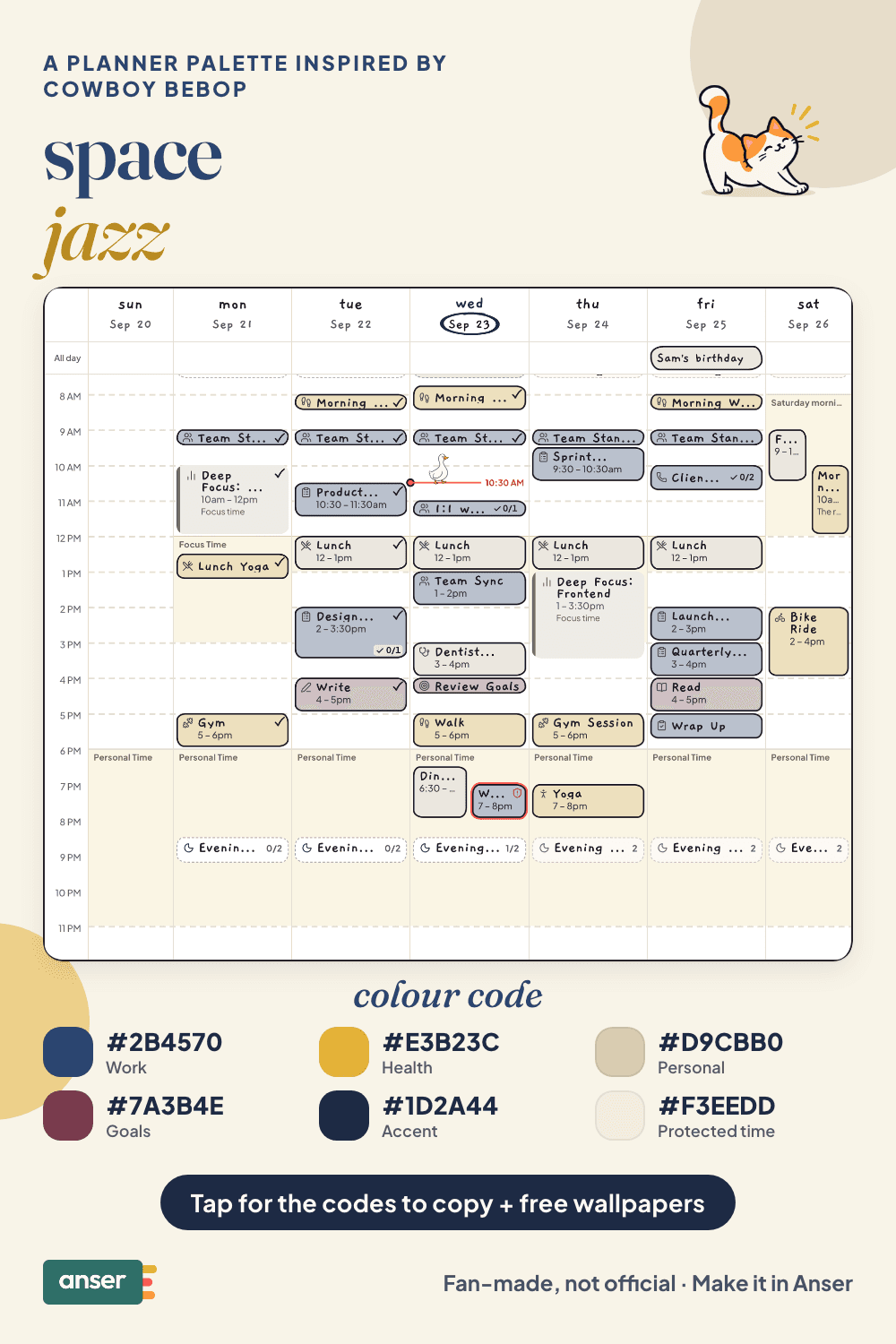
A week with some swing in it
- Leave room to improvise. Not every hour needs a name.
- One long, slow dinner. With whoever’s around.
- Music on, phone down. A whole album, start to finish.
- Let Friday end early. See you, space cowboy.
Make it in Anser
The quickest way: tap Use this palette in Anser on the palette. It opens on your own week, to keep or undo. To set it up by hand:
- In Anser, open Settings › Categories. Tap the colour next to Work and paste its hex code. Do the same for Health, Personal and Goals.
- Open Settings › Appearance › Colours and tap Save as my palette, so you can switch back any time.
- Still in Colours, under Accent, choose Your own and paste the accent.
- Open Settings › Boundaries › How protected time looks, choose Your own and paste the protected time colour. It also colours your Deep Focus time.
Changed your mind? Your saved palettes are under See all in Settings › Appearance › Colours.
Free downloads in space jazz
Free downloads
Free space jazz downloads
October and November calendar wallpapers for your phone and desktop, and a printable week in A4 and US Letter.
Pair it with a calm week
Your 9–5 is not supposed to become a 9–9. The 9–5 with Boundaries is a free schedule template you can add to your calendar or preview in Anser.
Use this in Anser
The 9–5 with Boundaries
Your 9–5 is not supposed to become a 9–9. Calm working days with an actual ending.
- 7:00 AM: Wake
- 7:45 AM: Walk and sunlight
- 9:00 AM: Deep work
- 12:00 PM: Lunch
- 1:00 PM: Meetings
- 2:45 PM: Focus
- 5:15 PM: Shutdown ritual
- 6:00 PM: Personal Time
More palettes like this
Try Anser free for 14 days, no card needed. A calm weekly planner that works with your Google Calendar, in the colours you like.


Comments
No comments yet.